|
<< Click to Display Table of Contents >> Working with Indicators |


|
Working with Indicators
|
<< Click to Display Table of Contents >> Working with Indicators |
|
NinjaTrader comes with over 100 pre-built technical indicators. You can add, remove, and edit them in the Indicators window. You can apply indicators to charts, the SuperDOM, and Market Analyzer columns, and you can create custom technical indicators in the NinjaScript Editor. For more information, see Charts, SuperDOM, Working with Columns, and Editor.
 Understanding the Indicators window
Use the Indicators window to add, remove, and edit all indicators on a chart. Accessing the Indicators window from a chartYou can open the Indicators window from a chart in any of these ways:
•Select Indicators in the chart toolbar •Right-click the chart background when no chart object is selected, then select Indicators •Double-click an indicator on a chart •Right-click a selected indicator on a chart, then select Properties •Press Ctrl+I, the default hotkey, when the chart has focus (see Hot Keys)
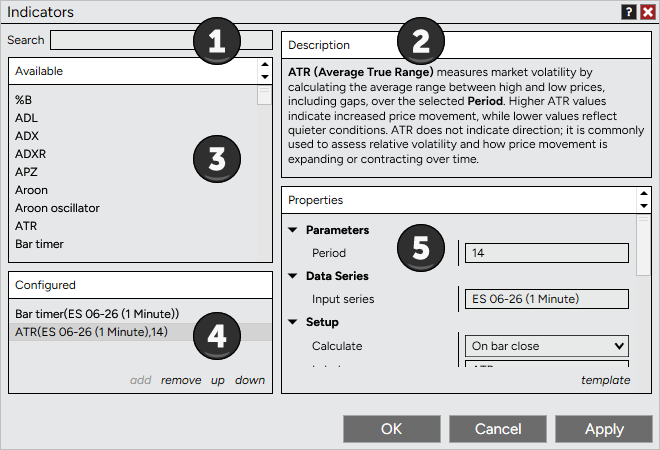
Sections of the Indicators windowThe Indicators window has five sections, shown in the image:
1.The Search section filters the available indicators by matching terms in the indicator name or the Description section 2.The Description section shows details about the selected indicator 3.The Available section lists the available indicators 4.The Configured section lists the indicators currently applied to the chart or SuperDOM 5.The Properties section shows the parameters of the selected indicator |
Adding an indicator To add an indicator to a chart: 1.Open the Indicators window (see Understanding the Indicators window) 2.Select the indicator you want to add in the Available section, then select add in the Configured section. Or double-click the indicator in the Available section to add it to the Configured section.
The indicator now appears in the Configured section. To edit its parameters, use the Properties section of the Indicators window (see How to edit an indicator’s parameters). |
How to edit an indicator’s parameters
Editing an indicator You can customize any indicator from the Indicators window.
1.Open the Indicators window (see Understanding the Indicators window) 2.Select the indicator you want to edit in the Configured section 3.Edit the parameters of the indicator in the Properties section
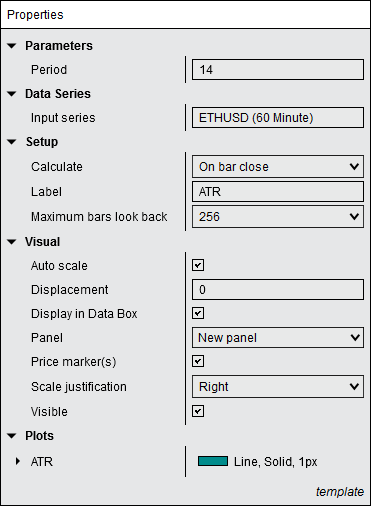
Chart indicator parametersThe following parameters are common to all indicators applied on a chart:
Saving an indicator’s parametersYou can save the customized parameters of an indicator as a template. If you save the template as Default, NinjaTrader uses your settings the next time you add that indicator to a chart.
For more information, see Saving Chart Defaults and Templates.
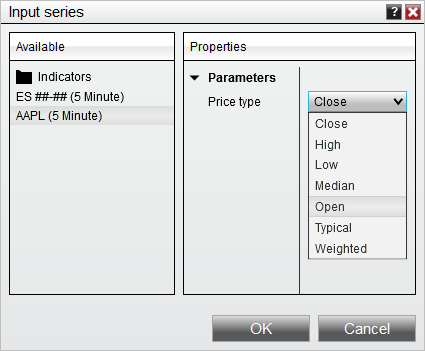
Indicator input seriesThe Input series window lets you choose the input series for the calculations of an indicator. To open it, select the Input series field. Then select the Close, High, Low, Median, Open, Typical, or Weighted price of any Data Series on the chart. You can also select another indicator as the input series. When you do, the Properties section of the Input series window shows the properties of that indicator, so you can configure it. This lets you nest multiple indicators. When you finish, select OK.
The image shows how to select a Data Series applied to the chart, or another indicator, as the Input series of an indicator.
|
How to hide or show all indicators
Hide or show all indicators on a chart You can hide or show all indicators on a chart in either of these ways:
•Right-click the chart, then select Show Indicators •Configure and use a hotkey (see Working with Hot Keys) |
Removing an indicator from a chart You can remove an indicator from a chart in any of these ways:
•Open the Indicators window (see Understanding the Indicators window). Then select an indicator in the Configured section, select remove, and select OK to close the Indicators window. •Select the indicator on the chart, then press the Delete key •Select the indicator on the chart, right-click it, then select Remove |
In addition to the indicators that come pre-built with NinjaTrader, you can create custom indicators. For example, you can create custom multi-series indicators that use price and volume data to apply to your charts or share with other traders.
For more information about using NinjaScript to build custom indicators, see NinjaScript. For indicator-development tutorials, see Indicator. |
Working with indicators in Market Analyzer columns
For information about working with indicators in Market Analyzer columns, see Working with Columns. |
Working with indicators in the SuperDOM
For information about working with indicators in the SuperDOM, see Working with Indicators in SuperDOM. |