|
<< Click to Display Table of Contents >> Using Time & Sales Quotes |


|
Using Time & Sales Quotes
|
<< Click to Display Table of Contents >> Using Time & Sales Quotes |
|
You can add quotes to the Time & Sales window to analyze real-time market prices.
 Understanding the Quotes window
Use the Quotes window to add, remove, and edit quotes in the Time & Sales window.
Accessing the Quotes windowRight-click the Time & Sales window, then select Quotes...
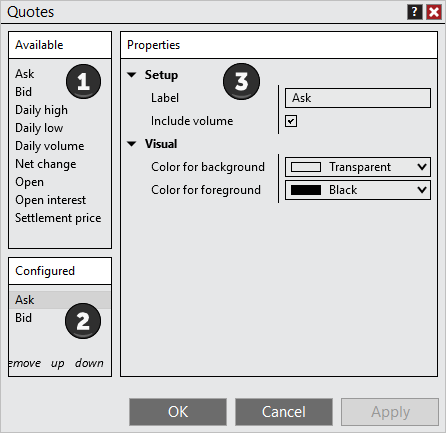
Sections of the Quotes windowThe Quotes window has 3 sections: 1.List of Available quotes 2.Current quotes Configured on the Time & Sales 3.Selected columns Properties
|
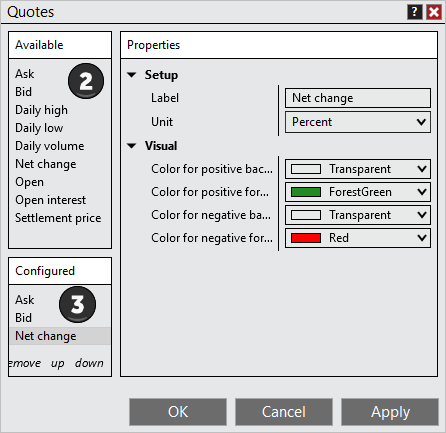
Adding a quoteTo add a quote to the Time & Sales window: 1.Open the Quotes window. For help, see Understanding the Quotes window. 2.In the Available list, select the quote you want to add, then select add. You can also double-click the quote. The quote appears in the list of Configured quotes. 3.Edit the quote’s parameters in the Properties section of the Quotes window.
|
Removing a quoteTo remove a quote from the Time & Sales window:
1.Open the Quotes window 2.In the Configured list, select the quote you want to remove 3.Select remove 4.Select OK to close the Quotes window |