|
<< Click to Display Table of Contents >> Attach to Indicator in Chart Trader |


|
Attach to Indicator in Chart Trader
|
<< Click to Display Table of Contents >> Attach to Indicator in Chart Trader |
|
Chart Trader can attach an order to an indicator plot. The order then moves with the indicator as its plot value changes. You can use this feature for entries and for resting exit orders such as stop losses and profit targets.
Attach to Indicator |
 How to attach an order to an indicator
Attaching an order to an indicatorUse the following steps to attach an order to an indicator:
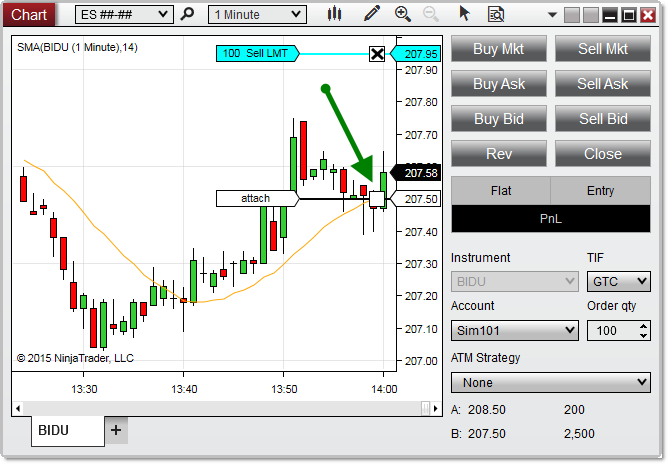
1.Apply at least one indicator to your chart, in the same panel as the Data Series where you want to place the order. For more information, see Working with Indicators. 2.Place a resting order on the chart. For more information, see Submitting Orders in Chart Trader. 3.Select the order label on the order line 4.Hold the Ctrl key. A ghost order line lines up with an indicator plot on the chart, with a label that reads attach. 5.Select anywhere in the chart while you continue to hold the Ctrl key 6.The Attach To Indicator Properties window opens. If more than one indicator is on the chart, select the indicator to attach the order to. 7.Change any properties you need (see Attach to Indicator properties), then select OK
In the image, the Ctrl key is held down after selecting the order label. The next selection opens the Attach To Indicator Properties window, where you can attach the order to the SMA plot on the chart. |
Attach to Indicator properties
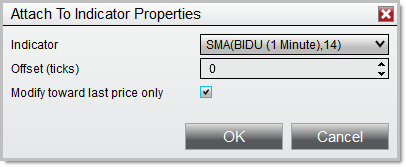
Attach to Indicator propertiesYou can open the Attach To Indicator Properties window in 2 ways. When you attach an order to an indicator, the window opens automatically, so you can set parameters for the indicator tracking before you attach the order. Or, follow these steps:
1.Right-click the label connected to the order line for an order on the chart 2.Hover your cursor over the order listed in the context menu 3.Select Attach To Indicator 4.Select Properties
You can set the following properties in the Attach To Indicator Properties window:
|