|
<< Click to Display Table of Contents >> The Sim101 Account |


|
The Sim101 Account
|
<< Click to Display Table of Contents >> The Sim101 Account |
|
The Sim101 account is a default account for placing simulated trades. It behaves like a live account: it has a cash balance, profit and loss, and other financial values. For example, when you place orders in simulation, NinjaTrader checks the Sim101 account to make sure you don’t exceed your buying power.
You can set the initial Sim101 account values, reset simulation values, and clear order history. To open these settings, go to the Control Center and select the Accounts tab. If you don’t see the Accounts tab, select the + tab, then select Accounts.
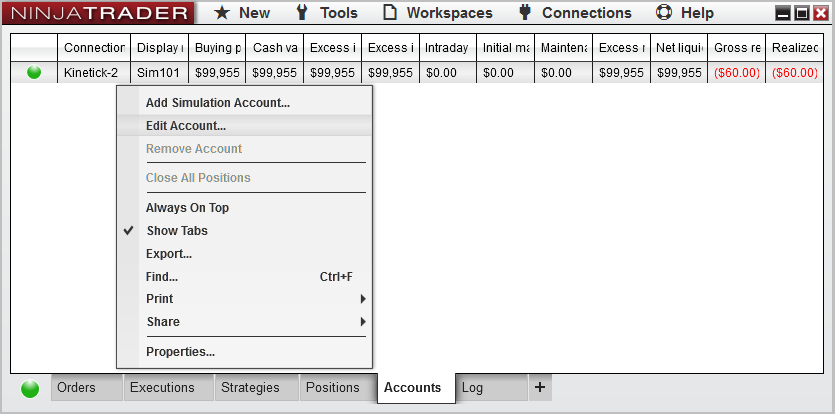
To reset the initial cash value, right-click the Sim101 account in the Accounts tab and select Edit Account....
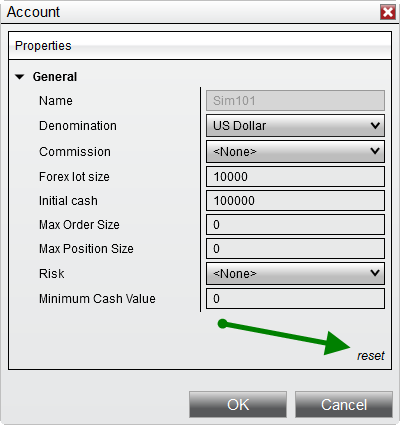
In the account properties:
1.Set the Initial cash property to the amount you want to reset the account to
2.Select reset
Note: The Denomination property currently supports only US dollars for simulation accounts. |