|
<< Click to Display Table of Contents >> Price Selector |


|
Price Selector
|
<< Click to Display Table of Contents >> Price Selector |
|
Order entry windows such as the Order Ticket, Basic Entry, FX Pro, and FX Board use a standard Price Selector to set the exact price for Stop-Market, Stop Limit, Limit, and MIT orders.
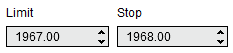
You can type a price directly in the Price Selector. You can also use shortcuts to set the current market price and to adjust the price with your mouse. The following table lists the shortcuts:
Middle mouse click |
Sets the last price |
Ctrl + middle mouse click |
Sets the ask price |
Alt + middle mouse click |
Sets the bid price |
Middle scroll up/down |
Adjusts the price by 1 tick |
Ctrl + middle scroll up/down |
Adjusts the price by 10 ticks |
When you select an order type, NinjaTrader makes the price fields for that order type available so you can edit the price before you submit the order. Fields that don’t apply to the order type are unavailable. A Stop Limit order uses both fields, so both fields need a value before you can place the order.
Limit order - Limit field
|
Market order - no fields
|
MIT order - Stop field
|
Stop Limit order - Stop and Limit fields
|
Stop-Market order - Stop field
|




