|
<< Click to Display Table of Contents >> New Menu |


|
New Menu
|
<< Click to Display Table of Contents >> New Menu |
|
The New menu in the Control Center has these items.
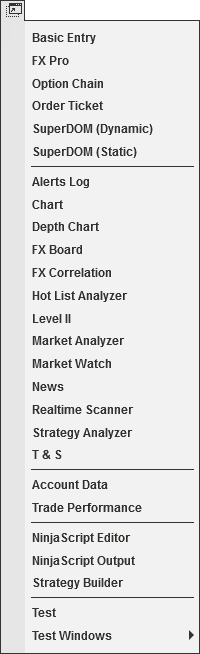
Creates a new Basic Entry window |
|
Creates a new FX Pro window |
|
Creates a new Option Chain window |
|
Creates a new Order Ticket window |
|
SuperDOM (Dynamic) |
Creates a new SuperDOM (Dynamic) window |
SuperDOM (Static) |
Creates a new SuperDOM (Static) window |
Creates a new Alerts Log window |
|
Calendar |
Creates a new Calendar window. See Calendar. |
Chart |
Creates a new Chart window. See Charts. |
Depth Chart |
Creates a new Depth Chart window. See Depth Chart. |
Creates a new FX Board window |
|
FX Correlation |
Creates a new FX Correlation window. See FX Correlation. |
Creates a new Hot List Analyzer window |
|
Creates a new Level II window |
|
Creates a new Market Analyzer window |
|
Creates a new Market Watch window |
|
Creates a new News window |
|
Pulse |
Creates a new Pulse window. See Pulse. |
Creates a new Strategy Analyzer window |
|
T & S |
Creates a new Time & Sales window. See Time & Sales. |
Account Data |
Creates a new Account Data window |
Creates a new Trade Performance window |
|
NinjaScript Editor |
Creates a new NinjaScript Editor window. See Editor. |
NinjaScript Output |
Opens the NinjaScript Output window, which includes the NinjaScript Utilization Monitor subwindow. See Output Window. |
Opens the Select which product window, where you choose AI Strategy Builder or Strategy Builder. See Strategy Builder. |
|
AddOn Framework |
An example of a custom NinjaScript add-on that you installed. See AddOn Development Overview. |