|
<< Click to Display Table of Contents >> Managing Positions in Basic Entry |


|
Managing Positions in Basic Entry
|
<< Click to Display Table of Contents >> Managing Positions in Basic Entry |
|
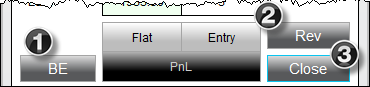
Manage open positions1.Select BE (break-even) to move any stop orders opposite your open position to the position’s average entry price. If your position is long, NinjaTrader moves the stop sell orders. To move only the Stop Loss orders of the active ATM Strategy selected in the strategy list, middle-click BE. NinjaTrader doesn’t modify orders that are already at a better price than the average entry price. 2.Select Rev to close the current open position and open a reverse position. 3.Select Close to close the current position and cancel any working orders for the instrument and account. To close only the selected active ATM Strategy, middle-click Close. NinjaTrader then closes the position size of that ATM Strategy and cancels any working orders for it.
For more about how closing works for each type of position, see Closing a Position or ATM Strategy. |