|
<< Click to Display Table of Contents >> Advanced Options |


|
Advanced Options
|
<< Click to Display Table of Contents >> Advanced Options |
|
All NinjaTrader order entry windows that offer ATM Strategies also include Advanced Options. The Advanced Options include the Shadow Strategy, Auto Chase, and Auto Reverse features. To find them, open the ATM Strategy Parameters window and select More to expand these additional features (see the image).
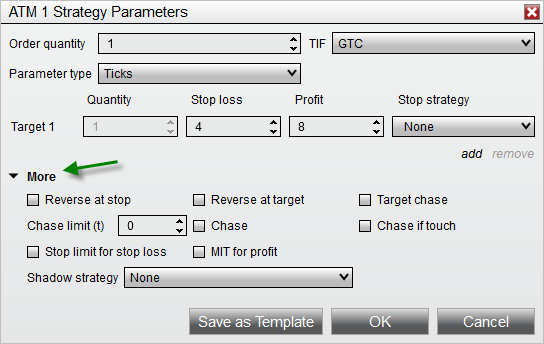
Reverse at stop |
Enters a position in the opposite direction, using the same ATM parameters, when a stop loss fills |
Reverse at target |
Enters a position in the opposite direction, using the same ATM parameters, when a profit target fills |
Target chase |
Moves a profit target toward the market price as price moves away from the target |
Chase |
Moves a limit entry order toward the market price as the market moves away from the order |
Chase if touch |
Turns on the Chase function only after the market touches the order |
Stop limit for stop loss |
When selected, NinjaTrader uses stop limit orders for stop losses. By default, this is cleared and NinjaTrader uses stop market orders. |
MIT for profit |
When selected, NinjaTrader uses MIT orders for profit targets. By default, this is cleared and NinjaTrader uses limit orders. |
Note: Stop limit for stop loss does not apply to equities or forex instruments. If you turn on this property for a stock or forex instrument, NinjaTrader uses stop market orders instead. |