|
<< Click to Display Table of Contents >> 8.1.9 |


|
8.1.9
|
<< Click to Display Table of Contents >> 8.1.9 |
|
8.1.9.0 Release Date
M D, YYYY
Features |
AI Strategy Builder: From Idea to Working Strategy, Fast Feature # 36304
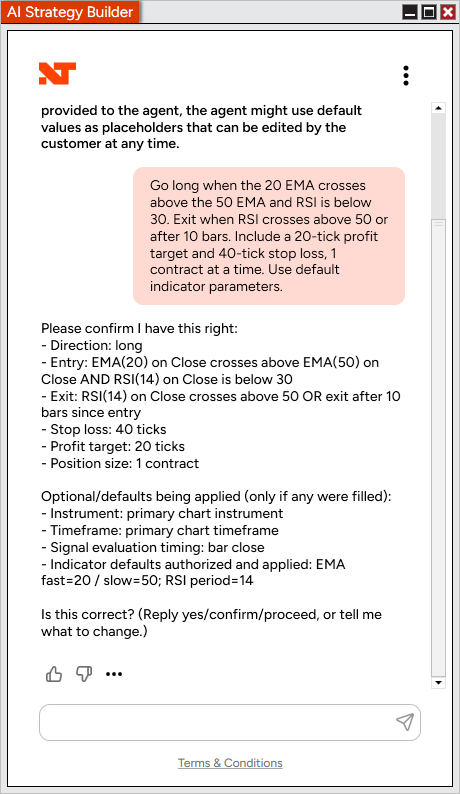
Turn your trading ideas into working strategies just by talking about them. AI Strategy Builder brings the power of AI directly into NinjaTrader Desktop - describe your entries, exits, and risk logic in plain English, and watch it generate a fully compiled, backtested NinjaScript strategy in minutes. No coding. No copy-pasting between tools. Just your idea, brought to life. A conversation, not a coding project
Open Control Center > New > Strategy Builder to get started. NinjaTrader runs a quick compile check to make sure your environment is ready, selecting AI Strategy Builder then drops you into a chat window where you describe your strategy in your own words. AI Strategy Builder asks the right questions to nail down your conditions and parameters, recaps the strategy for your confirmation, and generates it - automatically working through any compile issues along the way.
Once it's ready, a backtest kicks off instantly so you can see how your idea performs. Don't love a detail? Just keep talking. Adjust conditions, tweak your stop or target - all in the same conversation, with no need to start from scratch.
This is strategy development at the speed of thought - built for rapid prototyping, fast iteration, and turning "what if" into a testable strategy before you lose the idea. |
Tab-specific Chart Trader selections Feature # 47160
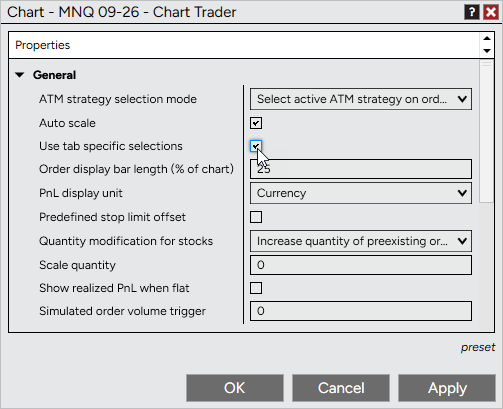
Trade different instruments with different setups, tab by tab. Chart Trader can now retain its own account, order quantity, and ATM strategy selections for each individual chart tab, so switching tabs no longer carries over settings from a different instrument or trading plan.
This is off by default, so existing workflows are unaffected unless you turn it on. To enable, go to Chart Trader properties and check "Use tab specific selections." |
Window snapping for NinjaTrader windows Feature # 47188
NinjaTrader windows now work seamlessly with Windows' built-in snapping tools, plus a brand new way to line them up with each other. Use Win+Arrow, drag-to-edge, drag-to-top to maximize, or hover the maximize button for Snap Layouts - all now supported on charts, Control Center, and other NinjaTrader windows. Resizing also feels more native, with proper sizing cursors and support for vertical maximize.
On top of standard Windows snapping, NinjaTrader windows now magnetically snap to each other. Drag a window near the edge of another NinjaTrader window and it will pull into place automatically, making it easy to build clean, tiled workspaces without manually lining things up pixel by pixel. Saved workspaces remember these layouts exactly as you left them.
Window snapping is on by default. To turn it off, go to Tools > Options > General and disable "Window snapping." You can also hold Ctrl while dragging to temporarily bypass snapping. |
Quickly hide all chart labels Feature # 50236
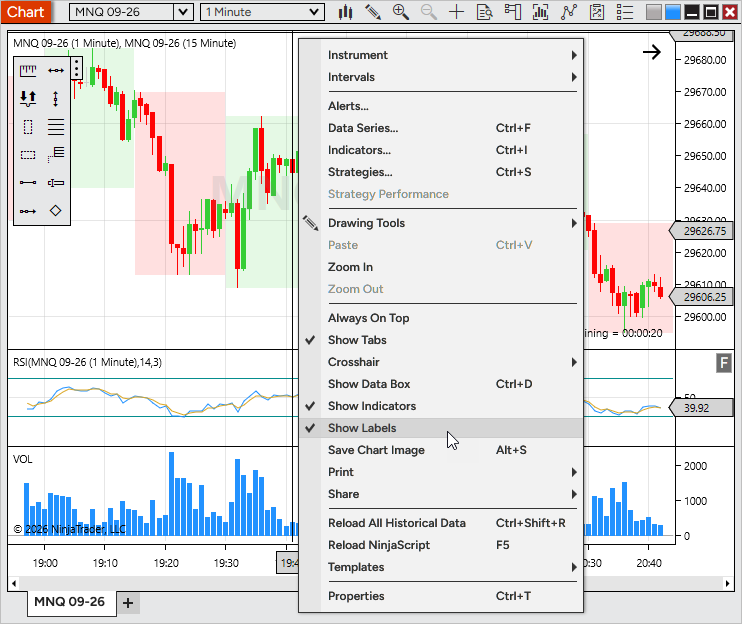
Declutter your chart in a single click. A new "Show labels" option lets you temporarily hide all labels on a chart without changing your underlying label setup - toggle it back on and everything returns exactly as configured.
Access it from the chart's right-click menu, or assign it a hot key for instant toggling. Find the hot key option under Chart > Actions in hot key configuration (no default key is assigned). |
Improved Pulling & Stacking columns for SuperDOM Feature # 42333
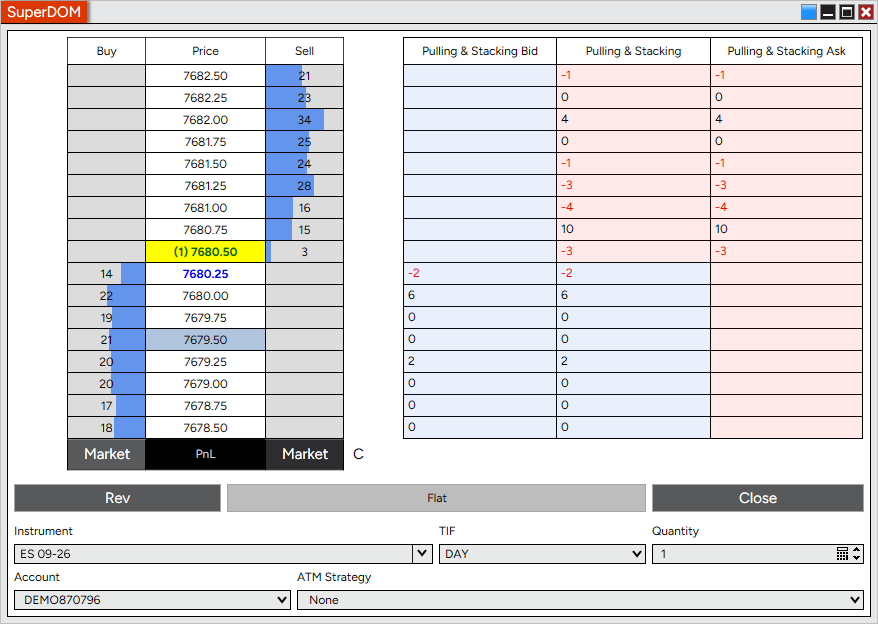
The Pulling & Stacking column has been rebuilt for more reliable, consistent results, giving you a clearer read on order book activity. In its place are three new columns: Pulling & Stacking (combined bid/ask), Pulling & Stacking Bid, and Pulling & Stacking Ask, each tracking changes in depth relative to a base level captured at load time.
Bid and ask values are color-coded for easy scanning, with customizable text alignment, backgrounds, and colors for positive and negative values.
To add a column, right-click on the SuperDOM, select Columns, choose Pulling & Stacking, Pulling & Stacking Bid, or Pulling & Stacking Ask, and select Add. |
Improved Recent columns for SuperDOM Feature # 42334
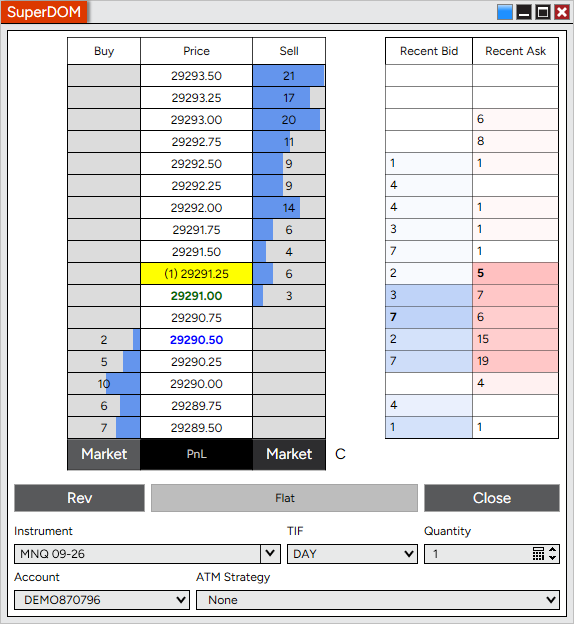
The Recent column has been split into two dedicated columns - Recent Bid and Recent Ask - for a clearer view of filled volume on each side of the ladder. Each column tracks accumulated volume since it was loaded, with the most recently updated cell bolded and briefly highlighted before fading back to normal.
Colors, text alignment, bolding, and highlight fade duration are all customizable to match your preferences.
To add a column, right-click on the SuperDOM, select Columns, choose Recent Bid or Recent Ask, and select Add. |
Depth columns for SuperDOM Feature # 42335
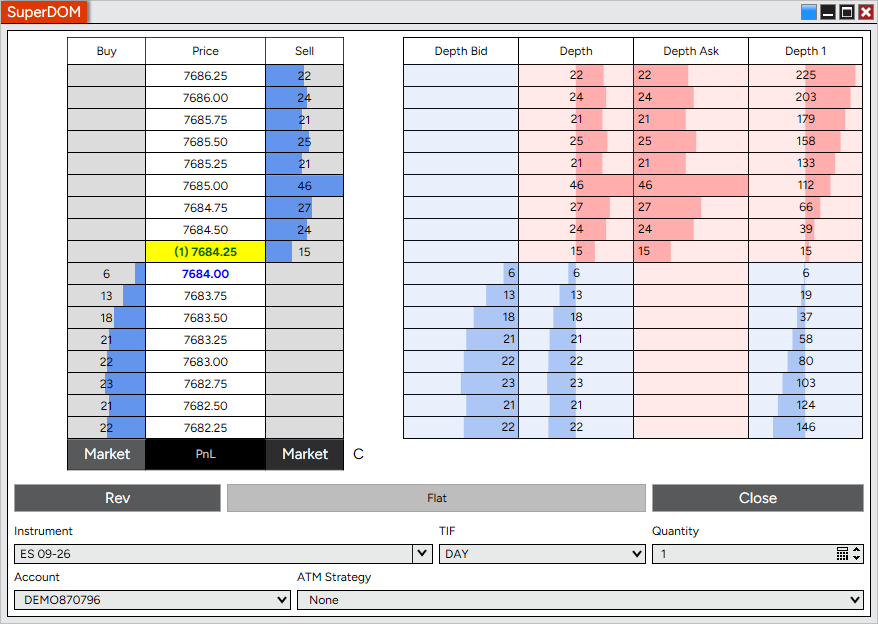
Three new columns bring the depth view from the Buy/Sell columns into a flexible, standalone format. Depth shows combined bid/ask depth, while Depth Bid and Depth Ask isolate each side, with optional histogram scaling normalized against the opposite side for easier side-by-side comparison.
Each column supports histogram or cumulative depth display, aggregated depth levels, and adjustable text and histogram alignment, so you can tailor the view to how you read the ladder.
To add a column, right-click on the SuperDOM, select Columns, choose Depth, Depth Bid, or Depth Ask, and select Add. |
Jump from a running strategy straight to its chart Feature # 51392
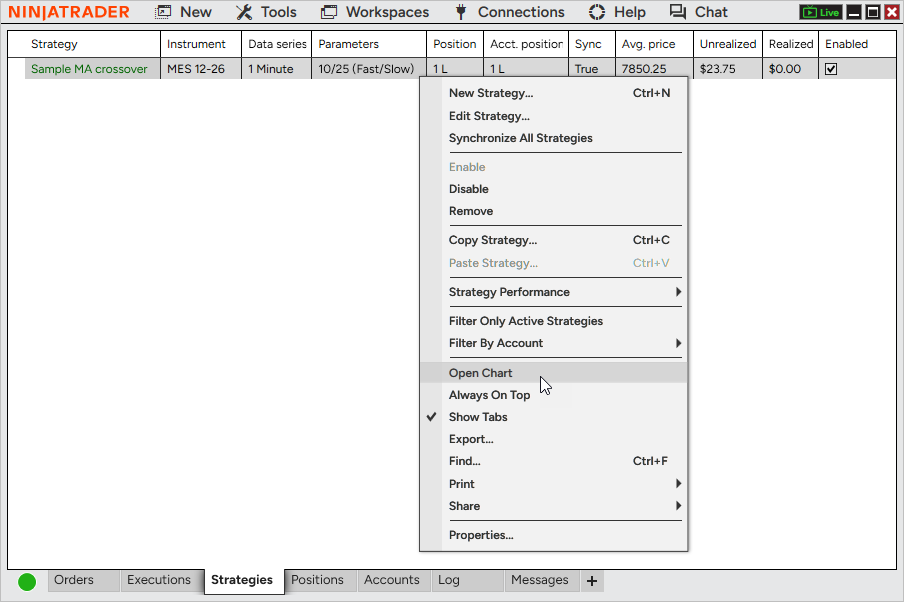
A new “Open Chart” option in the Strategies tab right-click menu opens a chart for the selected strategy, so you can see what it’s doing without hunting for the right chart or interrupting its execution. To use it, right-click a strategy in the Control Center’s Strategies tab and select Open Chart. |
Confirm close and order cancellation setting Feature # 38620
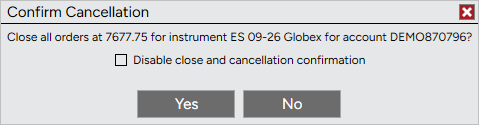
Add a safety net for manual closes and cancellations. A new "Confirm close and order cancellation" setting prompts you to confirm before closing an ATM strategy, position, or order, or canceling an order manually - helping prevent accidental clicks from affecting your trades.
This confirmation only applies to manual actions from the Close button or manually canceling an individual order; automated cancels, Cancel All, and Flatten All are unaffected. You can also disable the prompt directly from the confirmation dialog itself if you no longer want to see it.
This setting is off by default. To enable it, go to Tools > Options > Trading and check "Confirm close and order cancellation." |
Service status notifications Feature # 41403
Stay informed about maintenance and connectivity issues as they happen. Desktop now surfaces status notifications - like scheduled maintenance or ongoing service issues - directly on the Log In window and in the Control Center Log tab, so you have context if you're having trouble connecting.
Notifications appear automatically and update as the situation changes, with resolved issues logged once they clear. No setup is required, and there's nothing to enable or configure. |
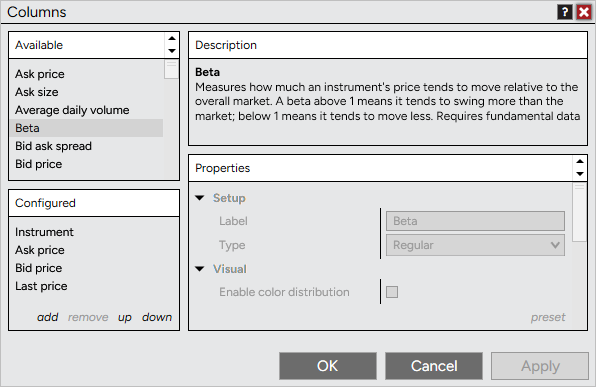
Column descriptions in Market Analyzer and Hot Lists Feature # 42961
Not sure what a column shows? Now you don't have to guess. The Columns window in Market Analyzer and Hot Lists includes a new description panel that explains what a column represents as soon as you select it, matching the description panel already familiar from the Indicators window.
Just click a column in the Available or Configured list to see its description appear. |
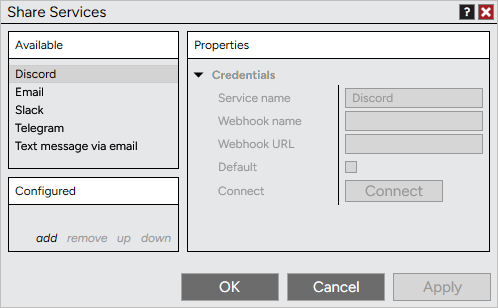
Share to Discord, Slack, and Telegram Feature # 44269
Sharing just got a lot more social. You can now share charts, workspaces, performance reports, and other supported content directly to Discord, Slack, or Telegram - making it easy to keep trading groups, communities, and collaborators in the loop without leaving the platform.
To set up a share service, go to Control Center > Tools > Settings, and under General select Share services. From there, authenticate with your desired platform and choose your destination - whether that's a specific channel, server, or direct message. |
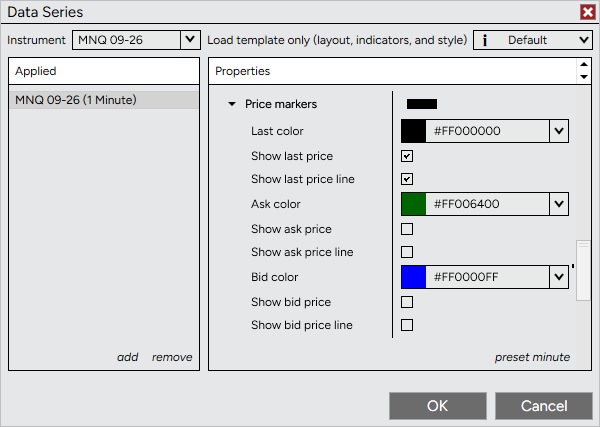
Price lines built into Data Series Feature # 50212
Price lines are now built directly into Data Series for faster, more responsive updates that stay in sync with their corresponding price markers. Last, bid, and ask price lines can each be displayed and customized independently. This replaces the standalone Price Line indicator, which has been removed. If you previously used the Price Line indicator, the Last price line will automatically be enabled to preserve your existing chart view. To configure, open Data Series Properties > Price markers, where you can independently show and customize the last, bid, and ask price markers and lines. |
Server-side Market If Touched orders Feature # 50225
Market If Touched orders on the NinjaTrader connection are now handled server-side, so your MIT orders can trigger and fill even if Desktop isn't running. This removes a long-standing limitation where MIT orders depended on Desktop staying open and connected to work as expected.
No setup is required - new MIT orders on the NinjaTrader connection automatically take advantage of server-side handling. |
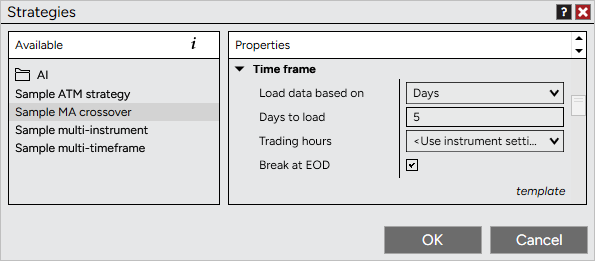
"Load data based on" for Control Center strategies Feature # 50234
Match your strategy's data settings between Charts and the Control Center. When adding a strategy in the Control Center, the Time frame section now includes the same "Load data based on" options available on Charts - Custom Range, Bars, Days, Weeks, Months, or Years - helping you avoid mismatched results between running a strategy on a chart versus in the Control Center.
Find this option in the Time frame section when adding a strategy from the Control Center. |
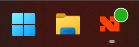
Connection status on the Taskbar icon Feature # 51403
Check your connection status at a glance, without switching windows. The NinjaTrader Taskbar icon now displays a status dot reflecting your connection state - using the same colors as the Control Center - so you can tell if you're connected, connecting, or experiencing a connection issue without bringing the Control Center into focus.
If you have multiple connections active, the icon reflects the overall status the same way the Control Center does. When no connections are configured, the icon stays clean with no dot shown. |
Visual Studio 2026 support in the NinjaScript Editor Feature # 39404
The Visual Studio launch button in the NinjaScript Editor now supports Visual Studio 2026, so you can open your NinjaScript projects without running into launch failures if you're on the latest version of Visual Studio. |
SuperDOM performance improvements Feature # 44273
The SuperDOM has been optimized to stay responsive during high-volume, fast-moving markets. Reduced internal overhead means smoother order book updates and less chance of the interface lagging behind during volatility. |
Faster, smoother Market Analyzer Feature # 44585
The Market Analyzer has been optimized under the hood for a smoother, more responsive experience overall. Scrolling and sorting feel snappier, alerts and highlight coloring process more efficiently, and switching tabs or reconnecting puts less strain on the platform. This also resolves an issue where loading a large instrument list - such as on connect or reconnect - could cause the platform to become unresponsive for extended stretches; setups with 500+ instruments now load dramatically faster. |
Issue # |
Status |
Category |
Summary |
40778 |
Fixed |
ATM Strategy |
Resolved a scenario where target quantities could be miscalculated after canceling one entry order while a second remained active on the same strategy |
54132 |
Fix |
ATM Strategy |
Exit order quantities can now be changed after cancelling an earlier bracket in a multi-bracket ATM strategy, instead of being refused with “You can’t change the size of a predefined strategy stop/target order” |
43698 |
Fixed |
Calendar |
Reminder combo-box controls now show their right-side border |
51393 |
Changed |
Calendar |
Added a hover highlight |
38377 |
Changed |
Chart |
A warning now appears if you try to roll over a futures contract before it's scheduled to do so |
44669 |
Fixed |
Chart |
TickReplay now handles the beginning-of-file timestamp correctly when loaded from a repository |
45755 |
Fixed |
Chart |
Resetting Sim101 now clears execution history from active charts |
51391 |
Changed |
Chart |
Double-clicking the x-axis now resets bar spacing and returns the current bar to the y-axis |
36959 |
Changed |
Connections |
Updated disclaimers for connections |
40946 |
Changed |
Control Center |
"Client Dashboard" has been renamed to "NinjaTrader Dashboard" with an updated default window width |
38842 |
Fixed |
CQG, Continuum, Order |
Resolved a scenario where a position held open overnight might not reflect a fill until disconnecting and reconnecting |
52108 |
Fix |
Chart, SuperDOM |
Descriptions for indicators and columns no longer truncate text on the right |
51402 |
Changed |
Connections |
The default multi-provider connection name no longer includes the “My” prefix |
54087 |
Fix |
Continuum, CQG |
The connection now attempts to reconnect after a clean WebSocket close instead of disconnecting outright |
53541 |
Fix |
Continuum, QG |
Market data subscriptions that fail mid-session now recover automatically |
51401 |
Fix |
Control Center |
The Suspended state warning no longer displays multiple times |
55282 |
Fix |
Control Center |
Corrected broken URLs, including the Help Guide and download links |
53851 |
Fix |
Control Center |
The Suspended state warning and log entries now appear on systems using Modern Standby |
50931 |
Changed |
Control Center, Strategy |
A confirmation prompt now appears when using Synchronize All Strategies |
41228 |
Fixed |
cTrader |
Resolved a connection failure caused by a TLS handshake issue |
42343 |
Changed |
Dialog Box |
Window height now adjusts based on the length of the message |
47161 |
Fixed |
Drawing Tool, Chart |
The Crosshair label now takes priority over the Vertical Line time marker |
47163 |
Fixed |
Indicator, Chart |
Range Counter and Volume Counter now match the chart's font size |
41493 |
Fixed |
Indicators |
The description panel now supports mouse wheel scrolling |
37847 |
Changed |
Input |
Editing data series watermarks or tab names now keeps variable tokens intact, so a single Backspace or Delete removes the whole chip instead of one character at a time |
46031 |
Changed |
Instruments |
Added support for a 0.00002 tick size |
52194 |
Changed |
Instruments |
Added support for a tick size of 2 |
55539 |
Changed |
Instruments |
Added MIAX exchange support |
41429 |
Fixed |
Localization |
Portuguese translations for settings and close actions have been improved |
40134 |
Fixed |
Log In |
The Taskbar icon now appears while the "How would you like to continue?" window is displayed |
51149 |
Fix |
Market Analyzer |
Rows can now be dragged when clicking on cell text |
41497 |
Fixed |
Market Watch, FX Board, Pulse |
Tiles no longer get stuck in a dragging state when dropped outside a valid area |
54424 |
Fix |
NinjaScript |
Sound playback from indicators and strategies using IsSuspendedWhileInactive no longer overlaps or plays loudly when switching chart tabs |
45378 |
Fixed |
NinjaTrader Conneciton |
Stability improvements |
39801 |
Changed |
NinjaTrader Connection |
Required user agreements are now presented directly within the platform |
41281 |
Changed |
NinjaTrader Connection |
A captcha will now display during auto-reconnect when one is required |
42515 |
Fixed |
NinjaTrader Connection |
Addressed a crash that could occur when disconnecting during a dropped connection |
42807 |
Fixed |
NinjaTrader Connection |
Addressed a crash that could occur during a reconnect loop after a server-side disconnect |
53760 |
Fixed |
NinjaTrader Connection |
Heartbeat timing, latency, and history are now tracked separately for each socket session, so a closing connection can no longer affect the state of a new one |
53305 |
Fixed |
NinjaTrader Connection |
Connections no longer stay stuck on “Connecting” until timing out with a SetupTradeDataQueue4 JSON exception, which affected accounts with certain order strategy history, including Simulation |
53100 |
Fixed |
NinjaTrader Connection |
Resolved an issue where the re-login fallback re-sent a bearer token instead of logging in and skipped the expired-credential check |
52624 |
Fixed |
NinjaTrader Connection |
Evaluate accounts no longer resubmit a known-expired Google credential when renewal fails |
52622 |
Fixed |
NinjaTrader Connection |
Resolved an issue where Live reauthentication failed after Google sign-in while Simulation succeeded |
43405 |
Fixed |
NinjaTrader Connection, Control Center |
Resolved a scenario where Gross Realized on the Account tab could show an incorrect value following an overnight session and a reconnects |
41392 |
Changed |
NinjaTrader Continuum |
Removed from the connections list, as it's no longer supported |
42372 |
Fixed |
Order |
Resolved a scenario where clicking Close again after a position Changed from an in-flight execution wouldn't submit an additional close order |
46160 |
Fixed |
Order |
Order status now updates properly if the correct state arrives after initially showing as unknown |
50211 |
Story |
Playback |
Allow adding playback accounts without Multi Provider enabled |
48397 |
Changed |
Prop Manual Lockout |
Added a tooltip to show when a lockout is active |
43119 |
Fixed |
Pulse |
Values now continue updating after a disconnect and reconnect |
43704 |
Fixed |
Regionalization, Connections |
Resolved a scenario where the Simulated Data Feed name stayed in the install language after switching to a different display language |
39524 |
Changed |
Rithmic |
Upgraded to Rithmic API version 13.7 |
44944 |
Fixed |
Rithmic |
Fixed a database error that could occur with Rithmic-based connections handling a large number of executions |
53460 |
Fix |
Rithmic, Orders |
Position updates are no longer dropped when multiple accounts on one Rithmic connection exit the same instrument at the same time, which could leave an account showing an open position after it was flat |
38750 |
Fixed |
Schwab |
The connection now drops properly instead of repeatedly attempting to reconnect during reauthorization |
46978 |
Fixed |
Strategy Analyzer |
Resolved a scenario where the delayed data message appeared on charts and instrument selectors, even though live data subscriptions don't apply there |
41290 |
Changed |
SuperDOM |
When Last price isn't available, Ask price is now used for the out-of-view marker and centering |
41399 |
Changed |
SuperDOM |
Renamed Auto center to Keep last price visible |
41924 |
Changed |
SuperDOM |
Depth histogram scaling is now standardized across the full enabled range |
42336 |
Story |
SuperDOM |
Updated Volume column default colors and added conditional properties |
40543 |
Fixed |
T&S |
Bid and ask display settings are now retained when saved as a preset |
38575 |
Fixed |
Trade Performance |
Fees now display as expected when duplicating the window |
48363 |
Fixed |
Trading Mode |
Free trial expiration messaging was off by 1 day |
38786 |
Fixed |
Workspace |
"Always on top" is now remembered when a tab is moved to a new window and saved |
42337 |
Changed |
Workspace |
"Show selected drawing markers" is now on by default in the Getting Started (Advanced) workspace |